Amazon enforces stricter image rules than most online marketplaces. Where eBay treats a white background as a recommendation rather than a rule, Amazon makes it mandatory for main product images.
This article covers every pixel dimension, file format, and framing rule you need to produce compliant images for Amazon listings in 2026.
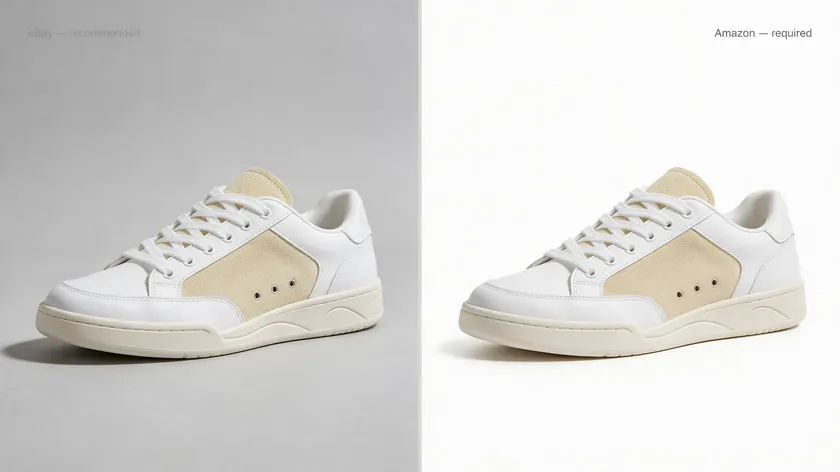
Table of Contents
Amazon Product Image Size Requirements at a Glance
Amazon’s product image specifications center on three pixel thresholds. The minimum image size for upload is 500 px on the longest side; anything below 500 pixels cannot be uploaded at all.
The practical floor is 1,000 px, because images below 1,000 pixels lose zoom functionality on the detail page. Amazon recommends images of 2,000 pixels on the longest side for the best balance of clarity and file weight.
The maximum the platform accepts is 10,000 px on the longest side with a 10 MB per-image file size limit. These technical requirements apply to every image you upload, whether it is the main image or one of your additional images in the gallery.
| Longest-Side Pixels | Effect on Listing |
|---|
| Under 500 px | Upload blocked entirely |
| 500–999 px | Uploads but zoom function disabled; small images in search results |
| 1,000–1,999 px | Zoom enabled; acceptable image quality for most product categories |
| 2,000–3,000 px | Detailed zoom; recommended range for high-quality images on desktop and mobile devices |
| 3,001–10,000 px | Diminishing returns; Amazon downscales for display anyway. |
The recommended image size for clarity falls between 2,000 and 3,000 pixels on the longest side. A full breakdown appears in the reference table later in this article.
Understanding Amazon’s Minimum, Recommended, and Maximum Image Sizes
Each of these thresholds exists for a specific reason, and knowing which one applies to your images can be the difference between a listing that ranks well and one Amazon quietly suppresses.
500 px: The Absolute Minimum
Amazon publishes a range of pixel dimensions instead of a single number because each threshold serves a different purpose. The 500 px absolute minimum exists as a technical gate.
1,000 px: The Practical Minimum

The 1,000 px practical minimum activates the zoom feature that lets shoppers inspect fine details like stitching, labels, and texture.
2,000 px: The Recommended Size
The 2,000 px recommendation is where image quality reaches the level most customers expect in 2026.
Images must be at least 1,000 pixels on the longest side to avoid the “image too small” warning and to keep your listing competitive. High-resolution images reduce return rates by giving buyers an accurate view of materials, colors, and dimensions before they commit.
Higher-resolution images consistently correlate with better click-through and conversion rates, since they let shoppers inspect details before buying.
Going above 3,000 px produces minimal visible improvement for shoppers. Amazon automatically downscales and recompresses files for display, so a 6,000 px upload does not render at 6,000 px on the detail page.
The extra file weight slows your upload, and Amazon’s compression pipeline can introduce artifacts that would not appear in a properly sized 2,000 px original. Better images come from higher source quality, not from inflating pixel counts beyond what the platform actually renders.
Aspect Ratio and Framing for Amazon Images
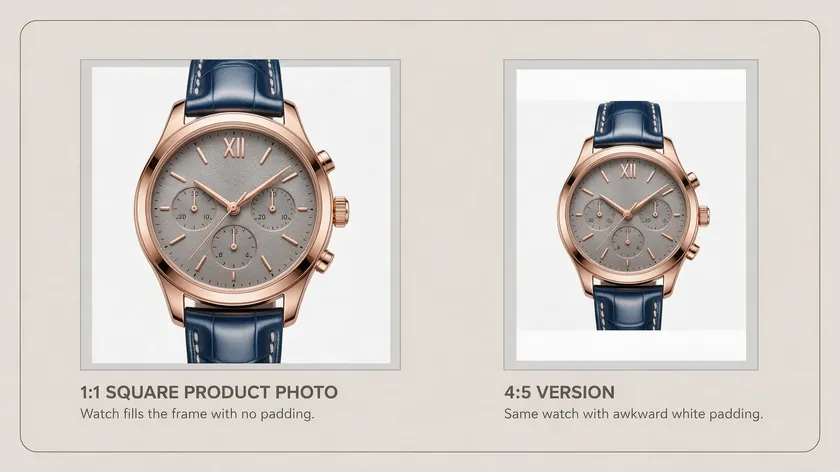
A 1:1 square aspect ratio is strongly recommended for product images on Amazon. Other ratios like 4:5 or 16:9 technically upload, but non-square files display with white padding or partial crops that make the product look smaller in search results and browse grids.
Square images at 2,000 × 2,000 px display consistently across the desktop detail page, the Amazon mobile app, and sponsored ad placements.
For tall or wide products like tripods, curtain rods, or soundbars, shoot at an angle or adjust framing so the item still fills the majority of a square canvas. For the full shot list, lighting, and camera setup behind clean marketplace photos, see our complete ecommerce product photography guide.
The product should fill at least 85% of the image frame; anything less shrinks the product in thumbnails and gives competitors with tighter framing a visual advantage.
Avoid adding large white bars above or below your product just to force a square format. That padding counts as wasted space and pushes the product further from the 85% coverage target.
Consistent aspect ratio and framing across your catalog also help buyers compare SKUs within your brand without jarring layout shifts in the image carousel.
Main Image Size and Requirements for 2026
The main image, also called the hero image, is what Amazon shows in search results, category grids, and as the first image on the detail page. It is the single most influential image in your listing because shoppers decide whether to click based on its thumbnail.
Images can influence purchase decisions faster than text descriptions, which makes the main image your primary conversion tool before the buyer even reaches your product detail page.
The main image must meet the same pixel dimension rules as any other Amazon image: at least 1,000 × 1,000 px, ideally around 2,000 × 2,000 px. Because the MAIN variant is where cropping and thumbnail scaling are most visible, even small framing errors become obvious.
The main image must show only the product being sold, with no props, alternative colors, or items not included in the purchase.
Images must be professional photographs of the actual product, not renders or sketches. Main images cannot include text, logos, or watermarks that are not physically part of the product itself.
High-quality images improve customer trust and conversions. A blurry or undersized hero image lowers click-through rates before shoppers ever see your lifestyle images, A+ content, or product features on the detail page.
Main Image Background and White-Point Requirements

Amazon requires a pure white background for the main image. The technical spec is RGB 255, 255, 255, which matches the white of Amazon’s own site, so the product appears to float naturally on the page.
Even a light gray (e.g., RGB 245, 245, 245) can trigger automated compliance checks that suppress your listing from search results.
Main images must have a pure white background regardless of product categories, with rare exceptions outlined in category-specific style guides on Seller Central. Gallery and lifestyle images may use colored or contextual backgrounds, but the hero image has no flexibility here.
If you photograph on near-white paper or fabric, the background will almost certainly register as off-white. Normalize it to exact RGB 255, 255, 255 in post-production.
For the editing workflow, including background removal and color correction steps, see the How to Edit Product Photos guide rather than trying to replicate those steps from scratch.
Frame Coverage Rules: Filling 85% of the Image Area
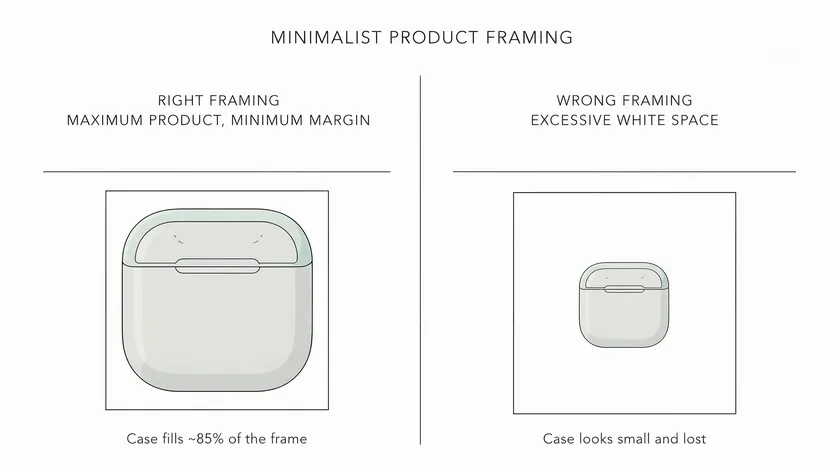
Amazon’s image requirements state that the product must fill at least 85% of the image frame in the main image. In practice, this means small, even margins of white around the product with no excessive padding on any side.
The 85% rule still accommodates products with unusual proportions. A tall bottle or a long keyboard can have its longest dimension nearly reaching the edge of the square while the shorter dimension sits centered. The combined coverage should still approach 85%.
Leaving too much white space makes a product look smaller or lower-value next to competitors whose hero images are framed tightly.
For multipacks or bundles, each included item can appear in the main image, but the combined arrangement should fill the majority of the square frame.
Show only one unit if the listing sells a single piece; do not display multiples to artificially inflate perceived value. Amazon expects the hero image to accurately represent exactly what the buyer receives.
Getting these three technical details right is what separates a compliant upload from one Amazon rejects or degrades.
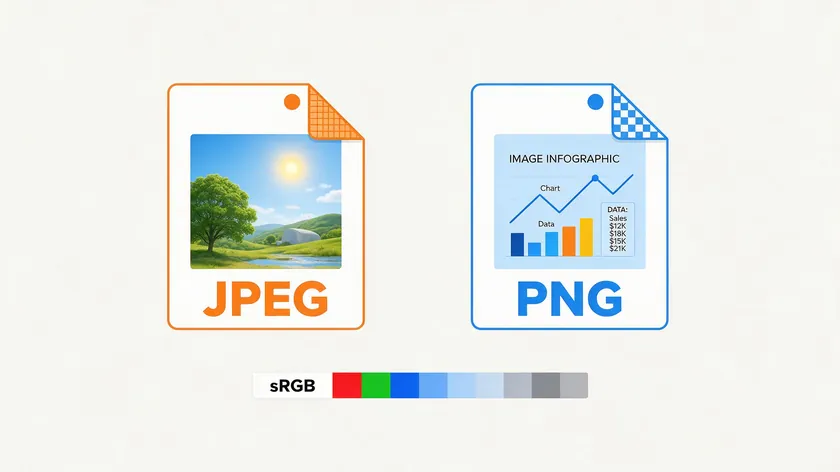
Amazon accepts four image file formats: JPEG (.jpg), PNG (.png), TIFF (.tif), and non-animated GIF (.gif). JPEG is the preferred format for Amazon product images because it balances high-resolution photography with manageable file sizes. PNG works best for infographic images where sharp text edges and transparency matter.
Color Space (sRGB)
Images should be in sRGB color space to avoid color shifts across different monitors and mobile devices. Uploading CMYK or Adobe RGB files often produces dull, desaturated colors on the detail page because Amazon’s rendering pipeline assumes sRGB. Set your camera and editing software to sRGB before export.
File Size Limits
The image file size limit is up to 10 MB per image, but most well-optimized 2,000 × 2,000 px JPEGs land between 100 and 500 KB. That range preserves visual quality while loading quickly.
Over-compressing before upload (pushing JPEG quality below 60–70%) introduces banding and blurriness that worsen after Amazon’s own reprocessing. Resolution should be at least 72 DPI, though pixel dimensions matter far more than DPI for on-screen display.
Amazon Image File Naming Conventions
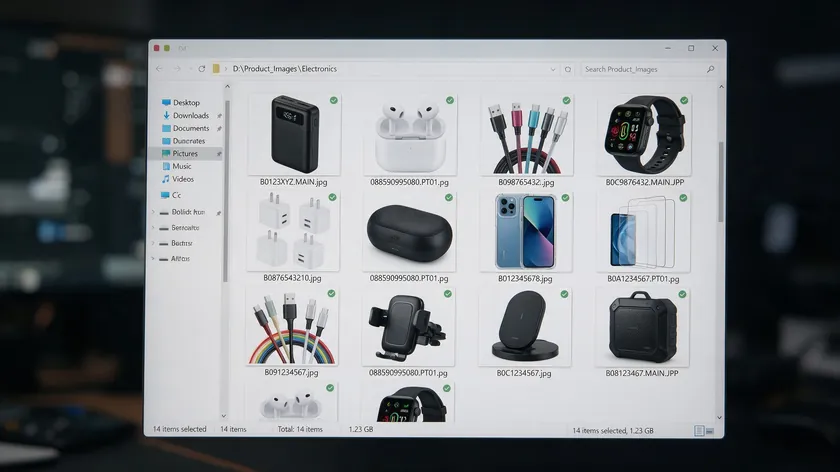
Amazon relies on image file names to match image files to the correct products and gallery slots during bulk uploads. Incorrect names cause images to be silently ignored or assigned to the wrong ASIN.
The standard naming structure is:
[Product Identifier].[Variant Code].[File Extension]
Examples:
- B0B1234XYZ.MAIN.jpg (main image using ASIN)
- 088590995080.PT01.png (first additional image using UPC)
Acceptable identifiers include ASIN, ISBN (10 or 13 digits), EAN, JAN, or UPC. Hyphens, spaces, and extra characters in the identifier portion are not allowed. Amazon’s documentation on the Seller Central image help pages includes selling partner-specific information on the full variant code list for bulk operations.
Common variant codes sellers use:
| Variant Code | Purpose |
|---|
| MAIN | Hero/main image |
| PT01–PT08 | Additional product views |
| SWCH | Swatch image (color/material) |
| TOPP, BOTT, LEFT, RGHT | Angle-specific views |
Following these naming rules prevents upload errors when using flat files or off-Amazon inventory tools. The image uploaded defines which slot it fills in the gallery, so a misnamed file can leave your listing with blank image positions or duplicate the same image in multiple slots.
How Amazon Crops and Displays Images Across the Site
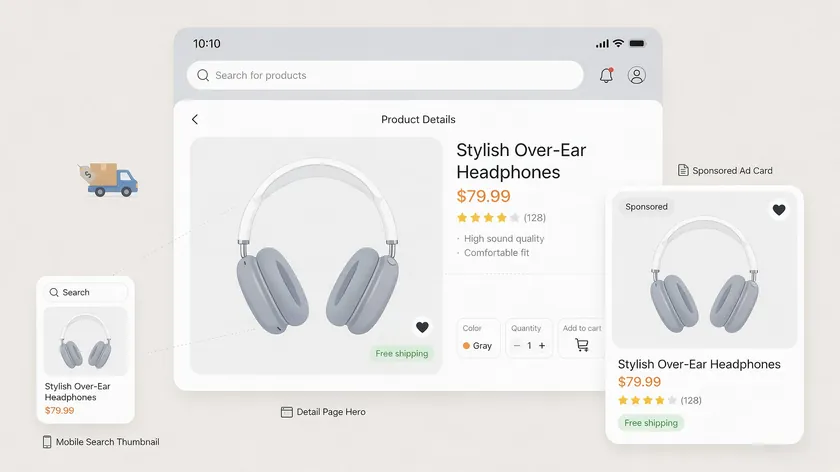
A single uploaded image appears at different sizes across Amazon: full-width on the detail page, mid-size in sponsored ad placements, and as a small thumbnail in search results and browse grids.
Amazon’s internal search and external search engines both pull the main image for display, so it needs to look clear at every scale.
Search result thumbnails on mobile devices can be as small as 150–200 px wide. At that scale, extra top or bottom padding shrinks the product to near-invisibility while competitors with tight framing appear larger and more instantly recognizable.
Keeping critical details like brand labels and key product shapes well inside a safe area roughly 5–10% from the edges prevents accidental clipping from adaptive cropping.
Amazon may adjust exact thumbnail dimensions over time, which is why extreme edge-of-frame compositions are risky for long-lived listings.
If you follow the recommended square format and 85% frame coverage, your products will display properly in most placements without rework when Amazon updates its layout.
Amazon Detail Page Images vs. Main Image
Not every image in your gallery is judged the same way—the main image and the secondary images follow the same technical specs but play very different roles in the listing.
Main Image Role
The main image and the secondary images on the detail page share the same core size and format rules, but they serve different roles. The main image must be clean, on a pure white background, and free of text or pricing details.
Secondary Image Role
Secondary images can include lifestyle scenes, infographic overlays, close-ups, and product angle images that help customers understand product shape and details from multiple angles.
All secondary images should still be at least 1,000 px (ideally 2,000 px) so they support zoom and match the main image’s clarity when shoppers click through the gallery.
Amazon recommends adding multiple images to assist customers in product evaluation, and the platform allows up to nine additional product images per listing. Keep a consistent size and aspect ratio across all detail page images to avoid layout jumps in the carousel.
A practical mix for most listings: one main image, two to three angle or detail shots, at least one lifestyle image, and one or two infographic images. Avoid sexually suggestive images or content that does not relate to the product being sold.
Do not show both the front and back in a single frame if it creates confusion about what is included; use separate gallery slots for each view instead.
Choosing the Right Resolution for Lifestyle and Infographic Images
Lifestyle images and infographic images must still follow Amazon’s image size rules even though they use colored backgrounds and text overlays.
Lifestyle Images
Lifestyle images show products in real-world settings, helping customers visualize how an item fits into their daily life.
Infographic Images
Infographic images highlight key product features and dimensions using callouts, icons, or comparison charts.
A 2,000 × 2,000 px resolution lets viewers zoom in on material textures, stitching, or context details in lifestyle shots. For infographic images, test readability at small sizes (400–500 px width) to confirm all text remains legible on actual mobile devices after Amazon’s resizing.
Use large, bold fonts and limit the number of text elements per image so copy stays crisp after compression.
Mobile image optimization matters because over half of Amazon shoppers browse on phones. Keep lifestyle and infographic images in the same aspect ratio as the main image (usually 1:1) for a uniform, professional-quality image gallery.
This consistency supports a consistent shopping experience and reinforces brand recognition across your catalog.
Use the table below as a checklist when preparing image files for upload. It consolidates the pixel dimensions, file formats, and practical notes for each image type.
| Use Case | Recommended Pixel Size | Minimum Size | Max Size / File | Best Format | Notes |
|---|
| Main product image | 2,000 × 2,000 px | 1,000 × 1,000 px | 10,000 px / 10 MB | JPEG | Pure white background; product fills 85% of frame |
| Secondary gallery images | 2,000 × 2,000 px | 1,000 × 1,000 px | 10,000 px / 10 MB | JPEG | Consistent square format recommended |
| Lifestyle images | 2,000 × 2,000 px | 1,000 × 1,000 px | 10,000 px / 10 MB | JPEG | Can use contextual backgrounds |
| Infographic images | 2,000 × 2,000 px | 1,000 × 1,000 px | 10,000 px / 10 MB | PNG | Test text legibility at 400 px width |
| A+ Content modules | 970 px wide (varies by module) | Per module spec | 10 MB | JPEG or PNG | Check current A+ module dimensions in Seller Central |
| Swatch images | 2,000 × 2,000 px | 1,000 × 1,000 px | 10,000 px / 10 MB | JPEG | Use SWCH variant code |
Always verify against Amazon Seller Central’s current Product image requirements page, as specifications may change after 2026.
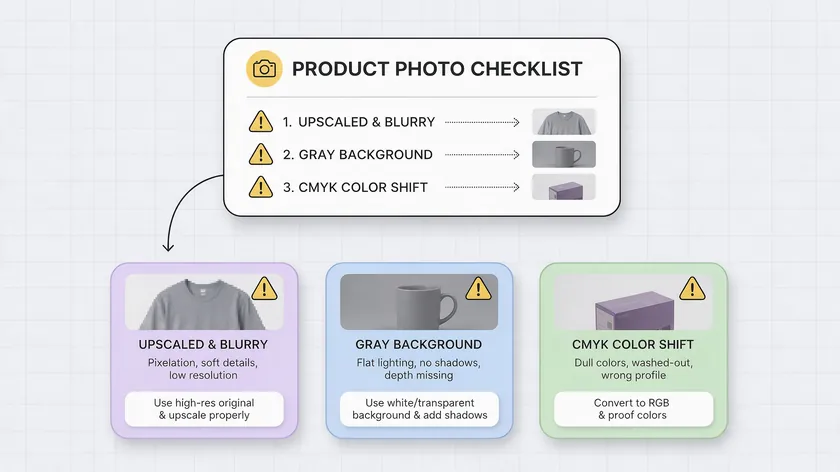
Most listing suppressions from image issues trace back to a handful of preventable errors. Review images in your catalog against these common problems before they trigger enforcement.
Undersized uploads
Uploading images under 1,000 px disables the zoom feature and may generate “image too small” warnings. Artificially upscaling a 600 px photo to 2,000 px does not add detail; it just produces a blurry, pixelated file that Amazon’s automated checks can flag.
Wrong background on the main image
Even RGB color values a few points off from 255, 255, 255 can cause suppression. Amazon has tightened automated background checks, and seller forums report rejections for backgrounds as close as RGB 250, 250, 250.
CMYK or the wrong color profile
Uploading CMYK files shifts colors toward dull, muted tones on screen. Always export in sRGB.
Inconsistent dimensions
Mixing 4:5 portraits with square images across one listing creates a jarring carousel. Pick one aspect ratio and apply it to every image.
Oversized files
Multi-megabyte PNGs slow page load and get recompressed by Amazon in ways that can degrade maintaining visual quality. Optimize images before upload.
Prohibited content on the main image
Adding text, pricing details, promotional badges like “Best Seller,” or such badges that are not physically on the product violates Amazon image guidelines and risks suppression.
Regularly check Seller Central’s image suppression reports and the Product Image Requirements Help page whenever Amazon rolls out new enforcement tools. Staying current on these image strategies protects your sales performance and keeps every listing visible.
Key Takeaways
- Amazon product images should be at least 1,000 × 1,000 px, with 2,000 × 2,000 px square images in sRGB JPEG format as the safest standard for most listings in 2026; Amazon accepts images up to 10,000 px on the longest side and up to 10 MB file size.
- The main/hero image must have a pure white background (RGB 255, 255, 255), show only the product for sale, and fill about 85% of the frame to stand out in search results.
- All gallery, lifestyle, and infographic images must follow the same core size and format rules so they stay sharp, zoomable, and compliant across desktop and mobile.
- JPEG is usually best for photos, PNG for infographic images with text, and images should stay under 10 MB.
- Correct file naming using ASIN/UPC plus variant codes (for example, B0B1234XYZ.MAIN.jpg) and supported file formats prevents upload errors and mis-assigned images.
- Following Amazon’s official image requirements protects product listings from suppression and unlocks zoom on the detail page.
Ready to produce Amazon-compliant images at scale? RemoveBackground.app’s online editor standardizes backgrounds to pure white and exports Amazon-ready JPEGs in seconds.
FAQ
What is the best Amazon product image size for 2026?
Amazon’s minimum is 1,000 px on the longest side, but a 2,000 × 2,000 px square JPEG in sRGB color space is the most reliable choice. This size produces a professional-quality image with detailed zoom on the detail page while keeping file sizes well under the 10 MB limit.
Going above 3,000 px offers little extra benefit. Amazon downscales and recompresses all uploads for display, so a 5,000 px file renders at the same on-screen quality as a sharp 2,000 px original. High-resolution images improve click-through rates, but the gains plateau once you pass the 2,000–3,000 px range.
Does DPI matter for Amazon product images?
DPI (dots per inch) does not affect how images display on Amazon. The platform renders images based on pixel dimensions, not print resolution. A 2,000 × 2,000 px file at 72 DPI looks identical on screen to the same file at 300 DPI.
Keep a 300 DPI master file if you also need images for packaging, catalogs, or other print materials. For Amazon, export a web-optimized JPEG at the correct pixel size and at least 72 DPI.
Pixel count is what determines whether the zoom feature activates and whether the intended image appears sharp on the detail page.
Can I use the same images for Amazon and my own website?
In most cases, yes. The same high-resolution square images work on both Amazon and an independent store, as long as they meet Amazon’s stricter rules (pure white main-image background, no overlaid text on the hero shot, correct pixel dimensions).
Your own site may benefit from alternate crops, branded backgrounds, or lifestyle-first layouts. It is efficient to maintain a single 2,000 × 2,000 px master set built for Amazon compliance, then adapt copies for your DTC storefront where branding flexibility allows.
How many images should I upload per Amazon listing?
Amazon allows up to nine additional images beyond the main image, for a total of ten in the standard gallery. Using as many relevant slots as possible is recommended.
A strong mix includes one main image, two to three product angle shots from multiple angles, at least one lifestyle image, and one or two infographic images at full resolution.
Every image in the gallery must meet the same minimum image size and format standards. Leaving slots empty when you have relevant product features to show wastes an opportunity to help shoppers manage product images in their mental evaluation and move toward a purchase.
Why does Amazon say my product image is too small even though it looks fine on my computer?
An image can look acceptable at a small size on your monitor yet still fall under 1,000 px on its longest side. Amazon checks pixel dimensions, not how the file appears on your screen. Right-click the file, check its properties, and look at the actual width and height in pixels.
If the file is under 1,000 px, reshoot or re-export at 2,000 × 2,000 px minimum rather than upscaling. Artificially enlarging a low-resolution photo with an image editor stretches existing pixels without adding new detail, producing a blurry result that Amazon may still flag.
High-resolution photography from the start eliminates this problem entirely and gives Amazon’s zoom functionality real detail to work with.
Small images hurt the customer experience and can suppress your product from appearing in search results alongside listings with clothing accessories or similar items photographed at proper resolution.