
This is a complete guide to ecommerce product photography—from your first shot idea to uploading polished product images to your online store.
You don’t need to hire a professional photographer or rent a studio; you can handle ecommerce photography in-house with basic gear and smart post-production. Strong product photography for ecommerce reduces returns, builds buyer confidence, and works across every marketplace you sell on.
The sections ahead cover shot types, setup, lighting, different angles, close-up details, and the editing order that ties everything together.
Table of Contents
What Is Ecommerce Photography, and Why Does It Matter?

Ecommerce photography is the practice of creating product images specifically for selling online. It is not general commercial photography or editorial work—its sole purpose is to represent a product accurately enough that a stranger on the internet feels confident spending money on it.
Whether you call it ecommerce product photography, product photography for ecommerce, or e-commerce product photography, the goal is the same: replace the in-store experience with visuals.
Customers shopping on your ecommerce website cannot touch fabric, flip a product over, or hold it up to the light. They rely entirely on your photos.
High-quality product photography helps buyers decide with confidence, because listings with several clear images answer more questions before the buyer has to ask.
Good product images can also reduce returns by clarifying details that text alone cannot convey—such as texture, scale, and true color. Ecommerce photography is essential for building customer trust and brand loyalty.
Consider a pair of sneakers. A single front-facing photo tells the buyer almost nothing about the sole pattern, the collar padding, or the color of the lining.
But six to eight well-planned shots—hero, side profile, back, sole close-up, texture detail, and a lifestyle image on pavement—answer nearly every question a buyer would ask in a brick-and-mortar store. Clear product photos help customers visualize the product’s use and value before they commit.
Even a solo seller in 2026 can compete with big brands by combining a smartphone, natural light, and a simple editing workflow. This guide walks you through planning, shooting, and post-production so your ecommerce store looks like it was built by a team twice your size.
Plan Your Ecommerce Shoot Like a Seller, Not a Photographer
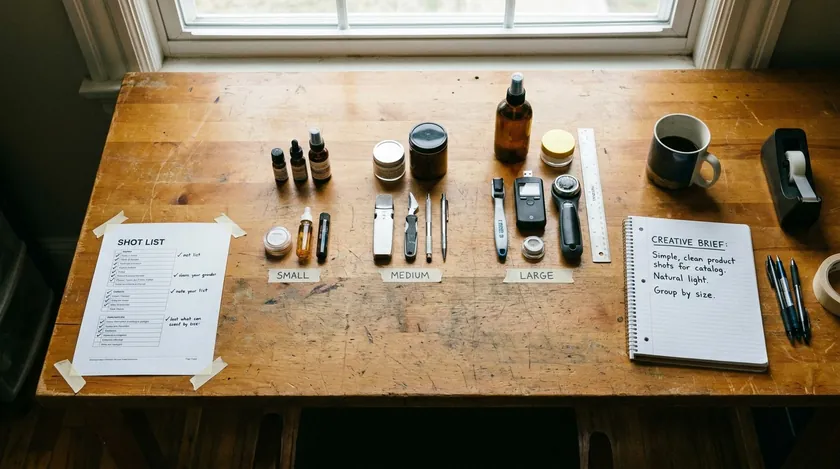
Clear planning saves hours on shoot day and prevents missing key product images. Before you touch a camera, think like a seller: what does a buyer need to see, and where will each photo live? A plan beats expensive equipment every time.
Define a Tight Shot List for Each SKU
Write a shot list that covers every view a potential customer might look for: main hero image, 45-degree angle, back view, detail close-up, size or scale shot, and at least one lifestyle image.
For a set of ceramic mugs, that list might read: front hero on white, handle detail, interior glaze close-up, mug held in a hand for scale, and a breakfast-table lifestyle shot. Taping this list to your shooting table keeps the session focused and prevents expensive reshoots.
Organize Products by Type and Size
Group different products by category and physical size—all small accessories first, then larger boxes—so you can keep lighting distances and camera height consistent without constantly readjusting your setup.
Decide Where Each Image Will Be Used
Map each photo to its destination: ecommerce store product page gallery, Amazon or Etsy listing, category thumbnail, email banner, or social posts. Knowing the end use upfront means you capture the right orientations and crop ratios the first time, avoiding the need to reshoot.
Use Simple Naming Conventions Before Shooting
Adopt a naming pattern like brand-sku-view-01.jpg before you start. Verify filenames and product variants before uploading images to ecommerce platforms—mislabeled images waste time and confuse customers browsing other variants.
Write a Basic One-Page Brief
A single-page brief is enough for any in-house team. Include brand colors, approved and banned props, background preferences, and required orientations (portrait, landscape, and square). This brief becomes the reference point for every future shoot, keeping your ecommerce business visually consistent as the catalog grows.
A good plan beats expensive gear for most ecommerce businesses. Invest thirty minutes in prep, and you will save hours in production and retouching.
Core Types of Ecommerce Product Photos You Need
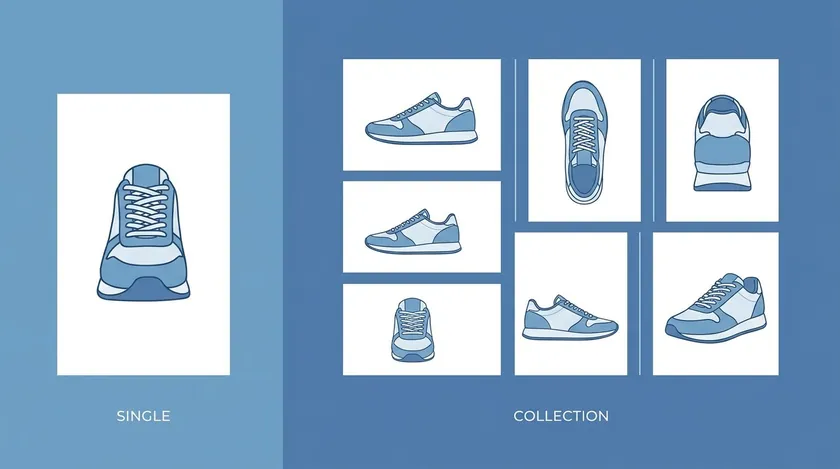
Think of this table as a visual checklist. Regardless of your niche, these are the shot types every online store should aim for on every product page.
| Photo Type | What It Shows | Where to Use It |
|---|
| Main hero on white | Full product, front-facing, on a clean white background | Marketplace main image, category page thumbnail |
| 45-degree product view | Depth and shape from an angled perspective | Product page gallery, ads |
| Straight-on front | Flat, undistorted front face of the product | Secondary listing image, comparison layouts |
| Back or side view | Rear details, side profile, ports, labels | Product page gallery, A+ content |
| Detail close-up | Texture, stitching, ingredients panel, small features | Product page, social media |
| Scale shot | Product next to a hand, coin, laptop, or credit card | Product page, FAQ image |
| Lifestyle or in-use shot | Product in a real-life context or being used | Brand storytelling, social, ads |
Lifestyle photography adds context to product images by helping a buyer picture the item in their own life. A ceramic mug on a breakfast table with morning light, or a backpack slung over a shoulder on a city street, does more for confidence than five extra studio angles.
Covering different angles and close-up details across these shot types answers the visual questions buyers would otherwise ask via chat or simply leave the page over. Print or copy this table as a checklist every time you launch a new product.
Minimum DIY Setup for Ecommerce Product Photography
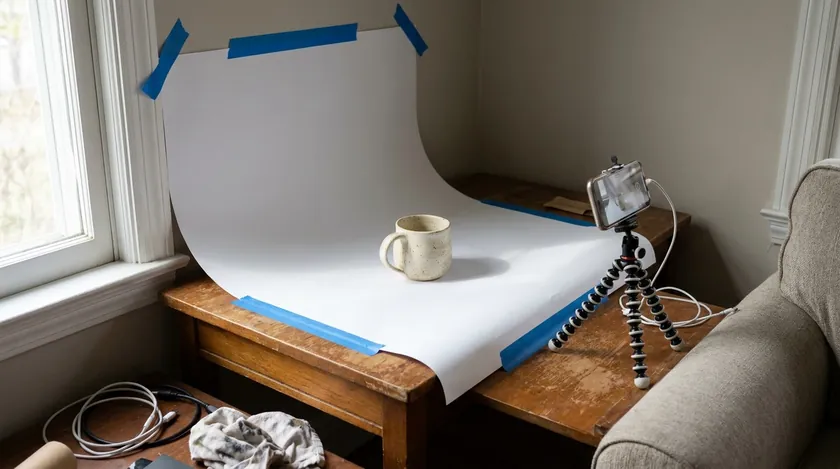
You can achieve professional-looking ecommerce images without a studio. A well-controlled setup is more important than the price of the camera for professional results—here is what you actually need.
Basic Camera Setup
A modern smartphone (iPhone 13 or later, or a comparable Android) handles most product photography well. If you prefer a dedicated camera, an entry-level mirrorless or DSLR camera paired with a macro or standard prime lens helps minimize distortion.
Using a narrow aperture—around f/8—keeps the entire product sharp and in focus. Camera settings require a stable tripod and a low ISO to prevent digital noise.
A tripod minimizes blur and ensures consistent angles across your whole catalog. Use a remote shutter or the self-timer to eliminate hand shake entirely.
Simple Background Solution
A sheet of white poster board or a roll of white paper taped to a table and curved up against a wall creates a seamless white sweep. Seamless backgrounds eliminate distracting lines and simplify post-processing. For the full DIY backdrop setup and cross-platform background rules, see our white-background setup guide.
One Main Light Source
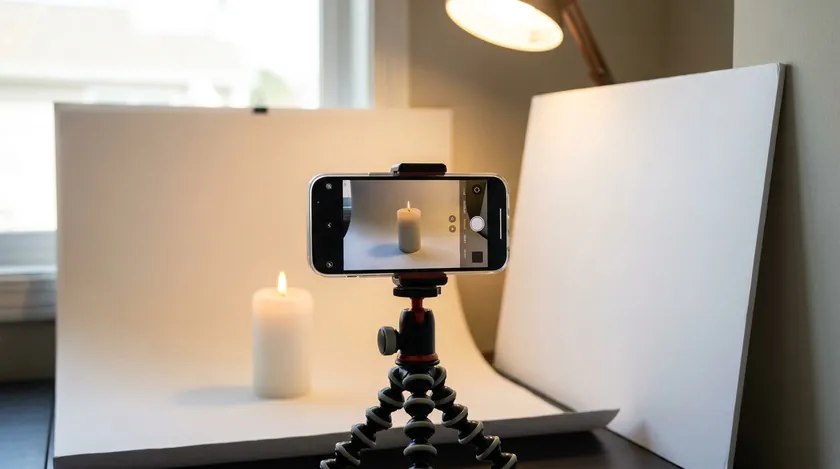
Use natural light from a large window as your single main light source. One well-placed source is enough to start, and a softbox can replicate it when you outgrow window light. The next section covers positioning and reflectors in detail.
Once you find a setup that works, mark positions on the floor and table with tape so you can replicate the same ecommerce photography look for every future session. Consistency in this stage saves enormous editing time later.
Positioning and Lighting: Working with One Light Source

Controlling one main light source—usually natural light—makes DIY ecommerce photography far simpler than juggling multiple fixtures. Place the product table near a window so light enters from the side at roughly 45 degrees.
Soften it with a thin white curtain or sheer fabric to avoid hard shadows on your product images. Soft diffused light minimizes harsh shadows and highlights detail, while lighting significantly impacts the quality of product photography and reveals the textures buyers care about.
Lighting is the foundation of professional imagery. Utilize soft, diffused natural light or, once you outgrow window light, a two-to-three-point studio lighting setup. Use reflectors to bounce light and fill in the darker side of the product.
For timing, mid-morning or late afternoon gives softer, more even light than harsh midday direct sunlight; overcast days act as a giant natural diffuser.
Repeating the same setup also makes later editing faster, because every image needs the same adjustments.
Shooting Workflow: From First Test Shot to Full Batch
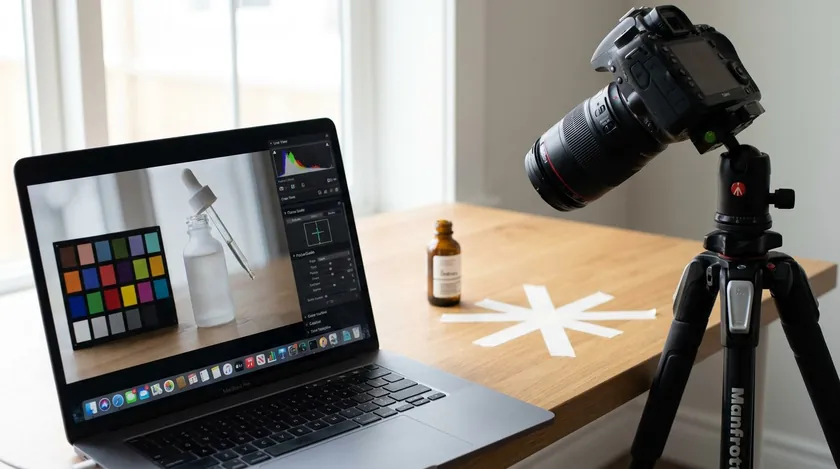
A repeatable workflow prevents mistakes, protects your time on shoot day, and keeps results consistent when you photograph multiple products.
- Set up the background and position the first product.
- Lock the camera on the tripod and frame the shot—leave extra space around the product so you can crop consistently in post-production.
- Set focus, exposure, and white balance. Use a gray card to establish consistent white balance for accurate colors across every image.
- Shoot a test frame. Use tethering for real-time image review to catch errors instantly, or at minimum check sharpness and color on a laptop or tablet rather than relying on the small camera display.
- Shoot the full batch. Maintain identical camera height and lighting distances for all items in a catalog.
- Rotate each product into the same marked spot, working through all planned angles before moving to the next SKU.
For example, shooting 20 skincare bottles in one session becomes efficient when each bottle slides into the same taped position and you cycle through hero, 45-degree, back, close-up, and scale shots before reaching for the next bottle.
At the end of the session, do a quick review on a large screen to confirm you have every planned angle and detail shot for each SKU. Reshooting one missing angle today is far cheaper than rescheduling an entire session tomorrow.
Capturing Different Angles, Close-ups, and Scale
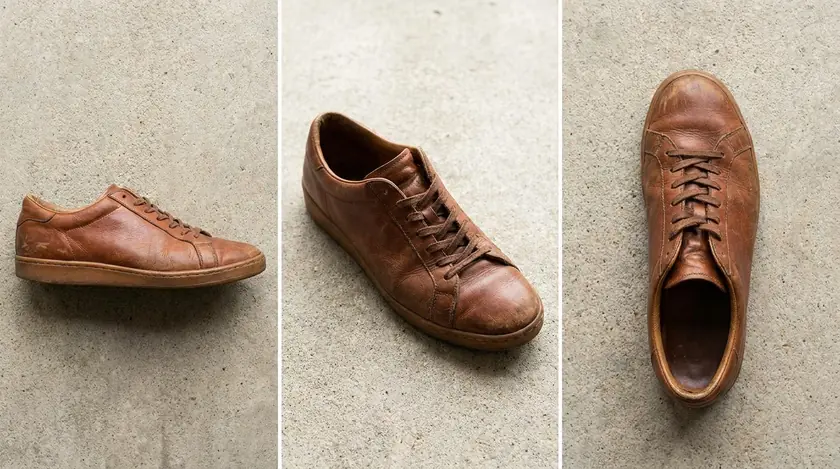
The angles and details you capture directly influence whether customers feel confident enough to buy. Shoot from multiple angles to showcase product features—every view should answer a specific question a buyer might have.
Eye-Level Front Shot
The straight-on front shot is usually your hero image. Keep the camera at the product’s midpoint so proportions look natural. Diagonal composition enhances eye-level product shots by adding a subtle sense of depth without distorting the shape.
45-Degree Angle Shot
Tilting 45 degrees reveals depth, curvature, and three-dimensional shape that a flat-front photo hides. This is often the most “browsable” image in a gallery because it mimics how a shopper would pick up and turn an item.
Overhead or Flat Lay
Flat lay photography is ideal for two-dimensional products and product sets—think jewelry collections, stationery kits, or clothing folded flat. Shoot directly from above with consistent spacing between items.
Back or Side Views
Back and side shots show labels, ports, closures, or structural details that front photos miss. For shoes, the side profile is often as important as the front hero.
Why Close-Up Shots Matter for Ecommerce
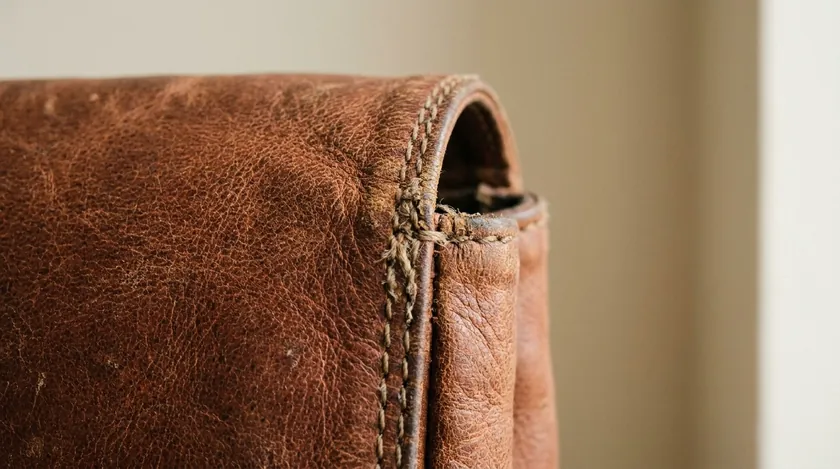
Close-ups reveal stitching on a leather bag, wood grain on furniture, ingredient panels on skincare, or connector ports on electronics. These micro-details reduce uncertainty and cut down on negative reviews caused by surprises after unboxing.
Simple Ways to Communicate Scale
Show the product in a hand, next to a credit card, or in a real-life context—a lamp on a bedside table or a wallet beside a phone. Scale shots are one of the most effective ways to reduce returns because they set accurate size expectations.
Angle Suggestions by Product Category
Shoes benefit from a side profile and 45-degree shot. Jewelry demands macro close-ups of stones and clasps. Home décor products shine in lifestyle room shots. Using props can enhance the storytelling of product images, but limit yourself to one or two relevant items so the product stays the focus.
Most marketplaces allow multiple images per listing, so covering every important view and detail gives buyers what they need to decide. Over-shoot slightly—extra angles and close-ups give you flexibility later for ads, social content, and seasonal promotions.
Background Choices and Marketplace Rules at a Glance
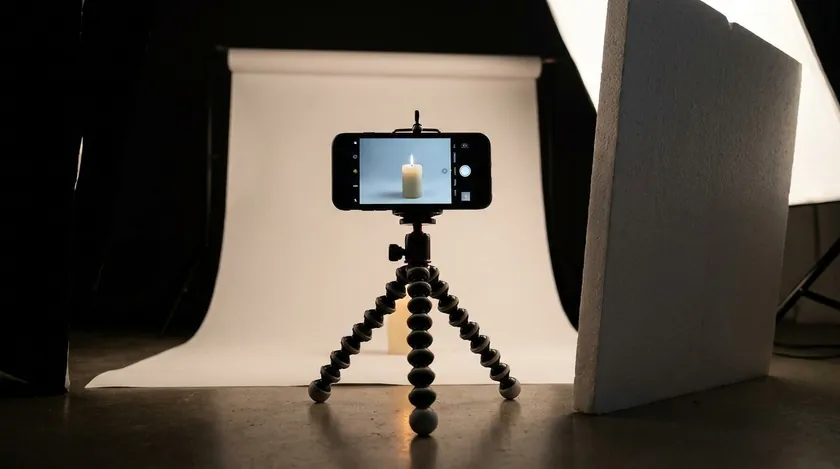
Plain, distraction-free backgrounds perform best for ecommerce photography, especially on marketplaces. A white background is the safest choice for main images on most platforms, with creative or lifestyle backgrounds reserved for secondary gallery slots.
| Marketplace | Background Expectation for Main Image |
|---|
| Amazon | White background required for the main image |
| eBay | White or light neutral background recommended |
| Walmart | Seamless white preferred; no watermarks, text overlays, or borders |
| Shopify | No platform-enforced rule; white or brand-consistent recommended |
| Etsy | No background color required; keep the item clear and centered |
For exact Amazon pixel dimensions and file format rules, see our Amazon Product Image Size guide. For eBay-specific background guidance, check our guide to eBay photo backgrounds. The full white-background DIY walkthrough and cross-platform comparison lives in White Background for Selling Items.
Ecommerce photography often uses white backgrounds for clarity on core product views. Save bolder colors, textures, or lifestyle scenes for brand storytelling slots where marketplace rules are looser.
Editing and Post-Production: The Essential Order of Operations
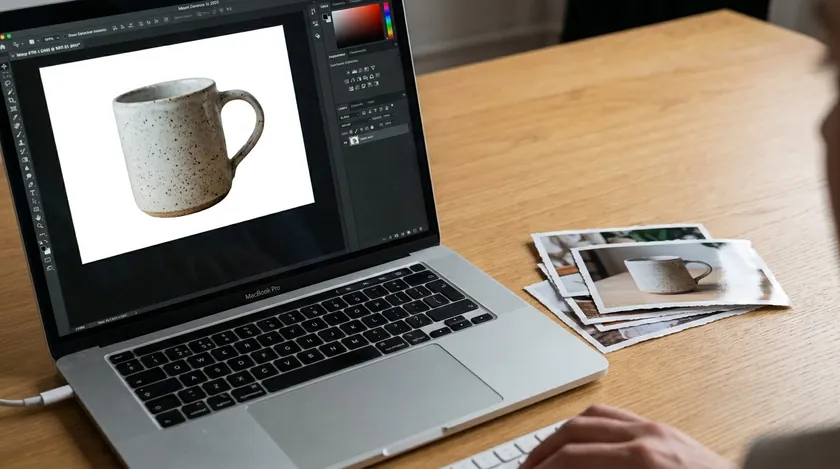
Thoughtful post-production turns a good product photo into a polished, marketplace-ready image without making items look fake. Post-processing should focus on color correction and dust removal—not heavy manipulation. Follow this order:
- Fix exposure and white balance.
- Adjust color and contrast—edit images to ensure they match the exact physical color of the product.
- Remove or replace the background.
- Clean up dust, scratches, or minor flaws. Retouch images lightly to enhance their appeal.
- Edit photos to ensure consistent sizing across all images, then crop and export.
Background removal tools like RemoveBackground.app can quickly generate clean, consistent backdrops from in-house shoots, especially for large batches of SKUs. For a deeper look at choosing the right method, see choosing the right background removal approach.
Avoid using filters to maintain product authenticity—buyers trust true-to-life color over stylized edits. Compress product images to improve loading speed; use web-optimized files and an image compression tool before uploading.
Batch editing and AI-powered tools can save hours once you have a standard look. Our How to Edit Product Photos guide covers the full workflow, automation tips, and common editing mistakes in detail.
Even free or built-in editing tools are enough if the shoot was well lit and sharply focused—expensive software cannot rescue a blurry, poorly lit capture.
Batching, Scaling, and Staying Consistent Across Your Online Store

As your ecommerce brand grows from a handful of SKUs to hundreds, consistency becomes more valuable than perfection. Standardize a “recipe” for your product images: same background, same light direction, similar crop ratios, and a predictable sequence of angles.
Shooting in batches by category—all mugs, then all plates—makes template-based background removal and batch editing much faster. Consistency in framing and color grading builds visual trust across your entire website.
The How to Edit Product Photos guide shows how to apply edits to whole batches so every product photo in a collection looks aligned. Consistent ecommerce photography builds brand recognition whether a customer finds you on your own ecommerce website, Amazon, or social media.
Common Shoot-Day Mistakes in Ecommerce Photography
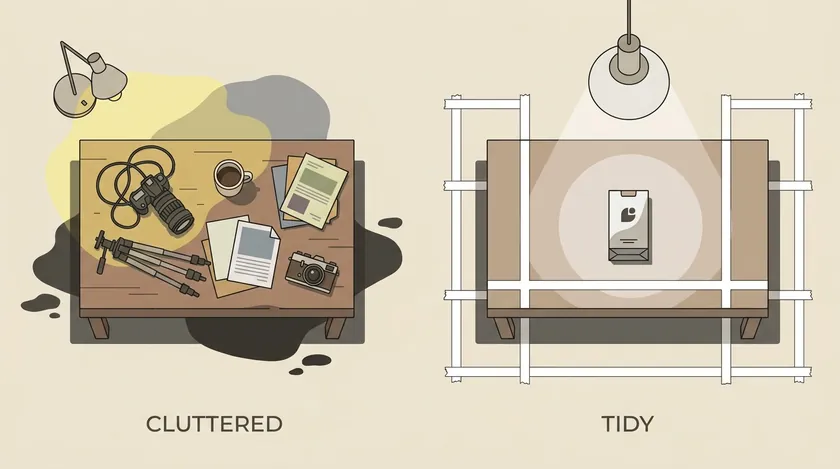
Many costly problems start on shoot day, not in editing. Prevention is always faster than fixing. Here are the mistakes that hurt online sales most often.
| Mistake | Why It Hurts Your Store | How to Avoid It |
|---|
| Inconsistent angles between products | Products look mismatched on category pages, eroding trust | Mark the tripod position and camera height with tape |
| Cluttered props that distract from the item | Buyers focus on the prop, not the product; avoid excessive props that distract from the product in images | Limit props to 1–3 relevant items per lifestyle shot |
| Skipping key shot types like back views | Customers guess at missing details, increasing returns | Print your shot list and check off each view per SKU |
| No preplanned shot list | Missing angles discovered only after tear-down, forcing costly reshoots | Draft the list the night before and tape it to your table |
| Constantly changing setups mid-session | Lighting and framing drift, creating an inconsistent catalog look | Batch similar products together and lock settings |
Treat your next shoot as a test run. After the session, note what felt slow or went wrong, then update your checklist. Small improvements in process compound across dozens of SKUs for any ecommerce business—the competition is often just one better system away.
Bringing It All Together for Your Ecommerce Business

You have now walked through the full journey: planning a shot list, setting up a simple studio with a single light source, shooting from different angles, and following a clean editing order with smart background removal.
The goal was never artistic perfection—it was trustworthy, clear product images that make buyers feel confident in your online store and across every marketplace you sell on.
Imagine launching a new collection of soy candles. Monday evening you write a one-page brief and shot list. Tuesday morning you set up a table near a large window, tape your white sweep, and mark positions.
In two hours you batch-shoot all six scents—hero, 45-degree, label close-up, hand-held scale shot, and a lifestyle scene on a wooden shelf.
That afternoon you run through the editing order, remove backgrounds, compress images, and upload. By Wednesday your listings are live with polished, consistent photography that stands out against the competition.
Once your brand locks in a repeatable “look,” it becomes easier to delegate tasks in-house or to part-time help while still keeping visual standards high. Treat product photography as an ongoing system you refine with each launch—not a one-off project you finish and forget.
The ecommerce photography tips in this guide are designed to scale with you, whether you sell five products or five hundred. Investing a little time in the process now will increase sales and save money on returns for years to come.
Key Takeaways for Ecommerce Product Photography
- Plan every shoot with a written shot list per SKU—capture hero, angles, close-ups, scale, and lifestyle before you tear down.
- One well-positioned light source (a large window or single softbox) with a reflector delivers professional product photography without a professional studio.
- Cover at least six to eight images per product, mixing different angles, detailed close-ups, and context shots to answer buyer questions visually.
- Keep backgrounds clean and marketplace-friendly; check platform rules before uploading.
- Follow a clear editing order—exposure, color, background removal, cleanup, and crop—and use tools like RemoveBackground.app to standardize product images at scale.
Put this guide into practice on your next shoot and upload a few test images on RemoveBackground.app to see how fast you can generate clean, marketplace-ready product photos—the same workflow works whether you run a small Etsy shop or a growing DTC ecommerce brand.
FAQ
Can I Do Ecommerce Product Photography with Just My Phone?
Modern smartphones from roughly 2020 onward are more than capable for ecommerce photography if paired with good lighting, a basic tripod, and careful composition.
Use the main wide lens rather than ultra-wide, keep ISO low, and tap to focus on the product with exposure adjusted slightly brighter if shooting against white.
The rest of the process—background cleanup and consistent cropping—can be handled in post-production using the same workflow you would follow with a dedicated camera.
How Many Product Photos Do I Really Need per Item?
Aim for six to eight images for most products: one main hero, at least two alternate angle shots, one back or underside view, one or two close-ups, one scale shot, and one lifestyle image.
Complex items like electronics or furniture may need extra detail shots, while very simple SKUs can get away with the lower end of the range. Every photo should answer a specific buyer question—if it doesn’t, it may be unnecessary clutter that slows your page without helping conversion rates.
How Much Does Ecommerce Product Photography Cost: DIY vs. a Studio?
A DIY setup can start with gear many sellers already own—a smartphone, a tripod, and white poster board—so the main cost is time rather than equipment.
Professional studios usually price per image or per project, and the total grows quickly with a large catalog, so it is worth getting quotes before committing.
A practical middle path is to shoot in-house with a repeatable setup and use editing tools to standardize backgrounds, saving studio budget for hero images or complex creative shots where you might hire a professional photographer for a single session.
Do I Always Need a Pure White Background for Ecommerce Photos?
Amazon requires a white background for the main listing photo, and Walmart and eBay prefer it, while Shopify and Etsy leave the choice to you. Brand sites and social channels also welcome softer colors, textures, or lifestyle scenes for secondary images.
Use white or near-white backgrounds for core “shop” views, then experiment with on-brand colors or lifestyle settings to tell the product story in different colors and contexts.
You can quickly standardize backgrounds later with a background removal tool if you start from a clean, simple setup—because uniform source photos need far less cleanup.
How Do I Keep My Product Photos Consistent over Time?
Document a simple style guide that records camera height, distance, preferred angles, background color, light direction and source, and basic edit settings. Mark tripod legs and product positions with tape, and reuse the same room and time of day where possible.
This small amount of documentation helps even when new team members start shooting in-house, keeping the ecommerce catalog visually unified as the business grows and you add new products every season.